Showing posts with label Talks. Show all posts

Saturday, September 14, 2013

Announcing S.M.U.G. Dev - Class of 2014.3

Today I’m happy to announce that S.M.U.G. Dev has been picked up for it’s 3rd Season.  If you don’t know what S.M.U.G. Dev is, it’s the Southern Most User Group – Developers.  S.M.U.G. Dev is part geek retreat and part code camp that is completely free for it’s attendees.
We have our annual meeting the Thursday prior to the South Florida Code Camp http://www.fladotnet.com/codecamp/ which happens to fall on February 22, 2014 next year.  Mark your calendar and make travel arrangements to make it down to Conch Republic better known as Key West FL, for S.M.U.G. Dev on February 20th, 2014.

Tentative Schedule

Wednesday February 19th 2014
  • 1PM - Annual Kick-Off Lunch at Sloppy Joes
  • 3PM-6PM - Group or Individual Site-Seeing
  • 6PM - ? – Kick-off Ceremony, last year was Joe’s Tap House
Thursday February 20th 2014
  • 8:00 AM - Breakfast
  • 8:30 AM – 12:00 PM Morning Sessions
  • 12:00 PM -  Lunch
  • 12:30 AM – 4:00 PM Afternoon Sessions
  • 4:00 PM – 5:30 PM Down Time/Site Seeing/
  • 5:30 PM Annual Sun-Set Picture at Mallory Square
  • 7:00 PM – 9:00 PM After Party
  • 9:00 PM – ? After-After Party
Friday February 21st 2014
  • 10:00 AM Breakfast (we won’t walk 5mi this year Kelvin :) )
  • Caravan and Travel to Speaker Party for South Florida Code Camp.
More details to follow to include available sponsorship packages and call for speakers!
We filled up last years venue and will need to find something bigger for this year.  If you are interested in joining me for a “scouting” mission to Key West sometime this fall, please email me at kevinw@software-logistics.
Come join us and help make S.M.U.G. Dev – Class of 2014.3 the best event to date!
-twb

Friday, December 4, 2009

Windows Phone Camp Resources – Windows Mobile Tools, Tips and Tricks

The following are resource links as discussed in my talk “Windows Mobile – Tools, Tips and Tricks”

- Slides and Source from Presentation

- Windows Mobile Developer Center

- Differences between Compact Frameworks, Full .NET Frameworks

- Windows Mobile Device Center

- Windows Mobile 6.0 SDK Refresh

- Windows Mobile 6.5 DTK (Developer Tool Kit)

- How Do I? Videos for Devices

- SOTI Pocket Controller Pro

- Speeding up Compact Frameworks Builds

- State and Notification Broker

- Great List of “How-To” items for Compact Frameworks

- Windows Mobile 6 Documentation

- Location of System_SR_ENU.cab (used for displaying useful error messages)
   %Program Files%\Microsoft.NET\SDK\CompactFramework\v2.0\WindowsCE\Diagnostics

- twb

Windows Phone Camp Resources – Building Location Aware Applications with Windows Mobile

Resources

Here are the links and resources as discussed in my Building Windows Mobile Location Aware Applications talk.

- Slides and Source from Presentation

- MSDN Article on create Location Aware Applications

- MSDN Article on cell tower lookup

- GPS Intermediate Driver Sample (From Windows Mobile 5.0 SDK)
             PROGRAMFILES\Windows Mobile 5.0 SDK R2\Samples\PocketPC\Cs\Gps

- Code Project on more detail for doing cell tower lookup

- Open Cell ID (Free data project for cell tower lookup)

- GPS Intermediate Driver Information (Configuration and Usage)

- Using FakeGPS
         Side Note: Configure Settings->System->External GPS to COM2 9600 Baud

- Tool for creating GPS text files

- Bing Maps Customer Service Site (Used to get tokens and credentials for web services

- Bing Developer Center Used to get AppId for AJAX and Silverlight integration

-twb

Wednesday, December 2, 2009

Windows Phone Camp – Tampa Edition

This weekend, December 5, 2009, I’ll be doing three and one-half sessions on Windows Mobile development at the Windows Phone Camp in Tampa.

Session #1

Getting Started with Windows Mobile Development (Tools, Tips and Tricks)
This session assumes you know a little bit about developing applications using Visual Studio 2008, specifically WinForms, but assumes you haven’t developed for Windows Mobile before.  We will cover the tools necessary to build Windows Application using .NET such as Visual Studio, emulators, device manager, security configuration as well as others.  We will build a small internet enabled application to demonstrate how it runs on the emulator and devices.  Time permitting I’ll also share some tips and tricks I’ve learned from developing real world applications for Windows Mobile.

Session #2

Building a Location Aware Application with GPS and Bing Maps
We will build on what we learned from the first session and create a useful application.  In this session, we will use the GPSID or GPS Intermediate Driver to acquire our current location.  In addition to the GPS, we will use Cellular towers to get a rough idea of the current location.  We will then “wire-up” our application to Bing Maps to display that information on a map.  Along the way we will introduce some additional Windows Mobile programming concepts such as how to load child forms, the GPS simulator and multi-targeting your application so you can develop i-mate JASJAR
MORE PICTURESand run your applications on the Desktop.


Session #3

Building Casual Games for Windows Phone, ZuneHD and Silverlight
Are you interested in building games, doing something a little different than your normal 9-5 activities?  If so you will learn how to leverage WiMo-GF or WiMo Game Frameworks to build games for mobile devices in a way that your game can be deployed to different platforms such as Windows Phone, Zune HD and Silverlight. The approach taken will ensure forward compatibility with Windows Mobile 7 once more information is available about this release.  Click here to see the Channel 9 video on WiMo-GF.

Session #3.5image

How to submit your app to Marketplace
In this session, my partner in crime Nikita Polyakov and I will discuss Windows Marketplace.  What it is, requirements for your application as well as a general discussion about this great opportunity.  We will build a setup application and review the web site used to submit your application.


As an added bonus, I might bring the collection of 20 or so devices I’ve accumulated over the years.

I hope to see you all there!

-twb

Sunday, November 29, 2009

John Papa’s Silverlight 4 Florida Homecoming Tour

In a limited engagement to Florida, John Papa will be presenting “What’s new in Silverlight 4”.  Software Logistics is proud to host this event at the Hyde Park room in the West Shore Hotel at 6:15PM on December 7.

Two hours isn’t nearly enough to cover all the cool new stuff in Silverlight 4, but you can get a taste of what John will cover by downloading the “What’s new in Silverlight 4” whitepaper from John’s site.

Food won’t be provided, but hotel policy permitting a BFD or two might find it’s way into the conference room :-)

After the event we will head over to Champions Sports Bar in the Marriot across the street to discuss all the goodness that is Silverlight.

image Please RSVP for this event at http://www.eventbrite.com/event/501691573

Hope to see you all there!

-ec

Tuesday, November 17, 2009

PDC 2009 – Oslo, Birds of a Feather Session

If you are out at PDC this year and are interested in Oslo, come check out my Birds of a Feather a session on Thursday Morning at 10AM.

http://microsoftpdc.com/Sessions/BOF111#comments

Hope to see you there!

-twb

Wednesday, September 30, 2009

Presenting at SW Florida Code Camp - October 3, 2009

This weekend, October 3, 2009, I will be presenting three, count them three sessions at SW Florida Code Camp.  I’ll also be making an announcement on something super secret and image super cool that I’ve been working on for the past couple months.

Here are the abstracts on the sessions I will be presenting

ORM Smackdown

Do you build applications that sit on top of a database? If so what do you use for your DAL or Data Access Layer? Do you use ADO.NET, code generation or maybe an ORM (Object Relational Mapper)? In ORM Smackdown you will be introduced to an open source project that compares and contrasts eight different ORMs to show their strengths and weaknesses. If you are looking for a deep-dive on a particular ORM, this session might not be for you. But if you want to get a good overview of the different products and how they work from a 50,000 foot level, check it out!

Game Programming on Windows Mobile

Are you getting tired of the same-old, same-old building Line of Business applications in your day job? Maybe it’s time to do something a little more fun in your precious spare time and potentially pickup a little extra cash along the way. With Windows Marketplace for Mobile coming later this fall, right now is an excellent time to jump in and get involved. A great place to do this could be building casual games that run on Windows Mobile Phones. In this session we will start from scratch using the WiMo-GF (Windows Mobile Gaming Frameworks) and build a simple game that includes some relatively advanced concepts such as physics, collisions and gravity.

Windows Marketplace for Mobile

In this session, Nikita Polyakov (Mobile Devices MVP) and Kevin Wolf (Mobile Device Collector) will introduce you to what it takes to get your Windows Mobile Application or Widget published to Windows Marketplace for Mobile. We will cover signing up for the program and any special requirements for your software as well as the steps involved to submit your application.

Thursday, August 27, 2009

Presenting ORM SmackDown at Jacksonville Code Camp and Pasco User Group

I’ll be presenting the current status of my research project ORM SmackDown at the Jacksonville Code Camp this weekend (8/29/2009) and the Pasco County .NET User Group meeting tonight (8/27/200).

If you’re traveling to Jacksonville and coming up early on Friday, let me know, if enough people are coming up early, I’ll hold a small reception Friday night at around 5PM at Residence Inn Jacksonville Baymeadows DM me on twitter @ByteMaster or email me at kevinw@software-logistics.com for more information.

Here’s a taste of what we will be reviewing:

image

Hope to see you all there!

-ec

Friday, August 14, 2009

Geeks At Bars – a Custom templating engine for ASP.NET MVC and Mobile Devices

I was looking for a topic to present at a Tampa MVC SIG meeting.  Last year I did a proof-of-concept for a client on a web version of their application using ASP.NET MVC that would run on an iPhone.  This was done on one of the first previews so porting it to the ASP.NET MVC RTW would be more work than starting from scratch.  I needed to come up with a new application that wouldn’t totally suck and put the audience to sleep while presenting.  After thinking about the “get-togethers” that Joe Healy (Tampa Developer Evangelist)  puts on after the user group meetings at the Green Iguana, it hit me, how about a site for this.  Hence “Geeks at Bars”.

The idea is a simple web site to let others know where developers are at chatting tech.  What makes this interesting is the ability present the same content with different controllers using different view templates.  The original support was built for the Desktop, Windows Mobile, iPhone and Android.  Blackberry is planned but due to the lack of a decent browser support it will require a unique template.

This most up to date source is located on CodePlex.  The rest of this post shows at a high-level how ASP.NET MVC was extended with a fairly robust templating engine to support mobile.

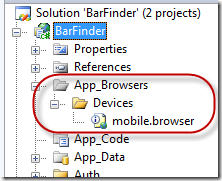
Step One – Download and copy the open source browser capabilities file from CodePlex into your project.  This file add some capabilities to parse additional attributes from the User Agent string that the browser/device sends to the server.  This file should be placed into the /App_Browsers/Devices directory as shown:
image

Step Two – Based upon information parsed from our User Agent string we need to figure out the type device that is requesting data so we can send down the correct skin.  First we create an enum for the different types of skins we will create remember we aren’t getting into a lot of details here and the code in this post is images so all the code can be downloaded at http://www.codeplex.com/geeksatbars :

image

Then we parse the data and return the skin type based upon content from the User Agent:

image

Note if you download and run DebugView it will output diagnostics information, before to click on Show Global Events to pickup debug messages from IIS.

Finally we add an extension method to the Browser instance so we can get the skin anywhere we can access the Request.Browser instance.

image

Step Three – Put in logic to use different master pages based upon the skin.  Our new view page will inherit from ViewPage and we override the OnPreInit method.

image

It’s important to note that all our pages will now need to inherit from GeeksAtBarsViewPage as follows:

image

Note – we still have MasterPageFile specified here as Desktop.Master but our OnPreInit method will make sure we use the proper one based upon the skin.

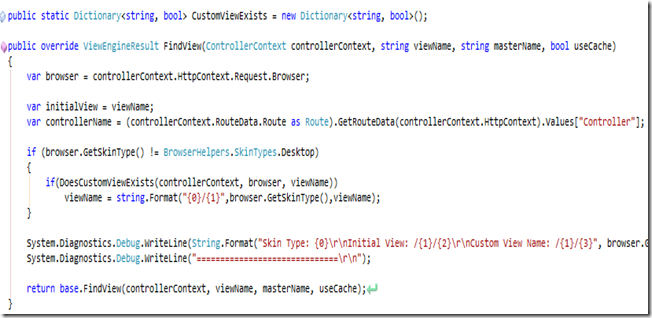
Step Three – We need to inherit from WebFormViewEngine and override the FindView method.  The FindViewMethod will check to see if we need to send down a different skin and if so return a different viewName.  We do this by checking to see if the file exists on disk and if so we change the viewName, once we determine we need to send down a different skin we cache that information so we don’t have to hit the disk each time.  Please download the source to get a better idea of how this works.

image

image

We also need to create the templates for the skins:

image 

Where MobileWebKit and WiMo are skins.  The custom view engine will see if a requested view exists within the directory corresponding to the skin.  If it does that view is used if it isn’t then the default view will be rendered.  That way we don’t have to create new views for every page in our site.

Step Four – We need to let ASP.NET MVC know which view engine to use, we do this within the Global.asax.cs file

image

Once we do this we should be ready to go. 

So in summary here is how this works.

  1. We downloaded and copied the mobile.browser file into the App_Browsers/devices directory.
  2. Next we created some extension methods on the Browser object to return the skin type.
  3. Then we created a new class that inherits from ViewPage that overrides the OnPreInit method to change the master page if the device needs a different skin.
  4. Creating a new ViewEngine that overrides the FindView method to see if a custom views template exists and if so return the path to that custom view.
  5. Then we create our custom view in the Views directory under a directory named the name of the skin that our custom ViewEngine will pickup.
  6. Our final step is to register the CustomView engine within the Global.asax.cs file.

This approach seems to be working out fairly well.  I left out some of the small details here, but I’m assuming if you made it this far you probably have a good idea of ASP.NET MVC but if you have any questions, drop me an email at kevinw –at- (slsys).net.  Again the source code has been released at http://www.CodePlex.com/geeksatbars

Enjoy and if you are talkin’ geek at a bar, fire up your Windows Mobile or iPhone navigate to www.GeeksAtBars.com and tell people about it!  One note: our current version doesn’t allow you to add bars on your phone, you need to do this in a full browser.

-ec