If you are out at PDC this year and are interested in Oslo, come check out my Birds of a Feather a session on Thursday Morning at 10AM.
http://microsoftpdc.com/Sessions/BOF111#comments
Hope to see you there!
-twb
If you are out at PDC this year and are interested in Oslo, come check out my Birds of a Feather a session on Thursday Morning at 10AM.
http://microsoftpdc.com/Sessions/BOF111#comments
Hope to see you there!
-twb
If you remember in our previous post we discussed how to model a state machine in using MGrammar. Up next, we are going to actually do something with this grammar. Since we last met, I released the project MGraph2POCO on codeplex. This library will allow us to parse our MGraph into POCO’s or Plain Old CLR Objects.
We are going leverage this project to build a small Silverlight Application that will allow us to parse input and build up an object graph that we can use to start running our state machine.
Here is our architecture, nothing fancy here.

Here is our application, click here to run it online. If no one has been to the app for a while, be patient, the squirrels are working as hard as they can to spin up an ASP.NET instance in IIS. See the previous post for samples of acceptable inputs.

To call the WCF service, we simply start a timer each time the text changes. If the text changes again before the timer fires, the timer is reset. Eventually when the user pauses typing the timer will fire and we will parse the text. Currently the timer is set to one second.
The code within the Silverlight application isn’t all that interesting. One thing to point out is that we are using an awesome free Rich TextBox control from VectorLight.net to do our syntax highlighting.
The server side is where all the magic takes place. Our WCF service will return an instance of a custom class we created called ParseResult. For our example this is tied to a StateMachine instance.

The class StateMachineParser that does the heavy lifting and is worth looking at. Here we are using MGraph2POCO that provides an extension method to DynamicParser to return a StateMachine instance.
To perform syntax highlighting within the Silverlight application, we are handing the TokenMatched event and adding the start and end locations for keywords to our parser result.
If we can’t parse the input, we set the Parsed flag to false and set some properties to also help us identify the error within the Silverlight application
So in this step, we have built a mechanism to parse the input and provide feedback to the users. Up next we need to validate and/or compile the definition to make sure our state machine is valid.
-ec
If you’ve been keeping up with my blog, you know I have a 'big-time’ interest in a little technology from Microsoft called Oslo. To make a long story short, the fundamentals of the way we develop systems has changed very little since I entered the industry in the early 90’s. Oslo, or probably the concepts behind Oslo could fundamentally change things.
As I go through the learning phase, I’m going to capture the experience in my blog. As articles and how-to’s get added, I’ll update this page. If you are interested in Oslo, you might want to book mark the permalink for this post.
Oslo – State Machine Editor in Silverlight – In this post we build a mechanism using Silverlight to capture the user input and provide feedback.
Oslo – MGraph2POCO – Open source library to deserialize MGraph to POCO.
Oslo – Modeling a State Machine – Third in a series of posts. This goes through the exercise of building a grammar to parse state machines.
Oslo in the next Generation Architectures – Second in a series of posts that will attempt to layout how Oslo could be used in building non-trivial business applications.
Oslo, what is Oslo? No, Not the city in Norway - First in a series of posts that will attempt to layout how Oslo could be used in building non-trivial business applications.
Parsing MGraph – a how to on using MGraph
Embedding MGrammar Files within your project – How to use MGrammar and Oslo in your .NET project.
When working with Oslo one of my biggest wants was the ability to deserialize MGraph to POCO (Plain Old CLR Objects). It doesn’t look this was going to happen anytime soon so I decided to just go ahead and write one. It actually turned out fairly well and I’m sure other people might find some use in it so I decided to put it on CodePlex.
http://mgraph2poco.codeplex.com/
Enjoy!
-ec
If you read my previous post, you would know it’s time for me to get a little technical and start describing how to use the actual bits. The premise of my previous post was that modeling Finite State Machines (FSM’s) could be one of the core building blocks of real-world implementations of Oslo.
I’m working with the May 2009 CTP that you can download and follow along.
So the idea is we want to build a couple different grammars for parsing our state machines, one that is plain text English and one that is more terse. Here are some examples of the inputs we want to parse.
The states of our Invoice are New, Reviewed, Submitted, Paid, Overdue, Cancelled.
Invoice States: New, Reviewed, Submitted, Paid, Overdue, Cancelled;
And input for our transitions:
An Invoice can transition from New to Reviewed and Cancelled.
An Invoice can also transition from Reviewed to Submitted and Cancelled.
An Invoice can also transition from Submitted to Paid, Overdue and Cancelled.
An Invoice can also transition from Overdue to Paid and Cancelled.
Invoice transition: New to Reviewed, Cancelled;
Invoice transition: Reviewed to Submitted Cancelled;
Invoice transition: Submitted to Paid, Overdue, Cancelled;
Invoice transition: Overdue to Paid, Cancelled;
After you have installed Oslo you should see a new program you can start called Intellipad this application is an extensible Swiss Army Knife for working with Oslo. We will use Intellipad to construct and test the specification for our DSL.
First thing we need to do to is change the mode to “DSL Grammar Mode”.

This will give us four panes:

Let’s start out by authoring our Domain Specific Language or DSL. We want to build a DSL Grammar that will be used to parse the following text.
The states of our Invoice are New, Reviewed, Submitted, Paid, Overdue, Cancelled.
An Invoice can transition from New to Reviewed and Cancelled.
An Invoice can also transition from Reviewed to Submitted and Cancelled.
An Invoice can also transition from Submitted to Paid, Overdue and Cancelled.
An Invoice can also transition from Overdue to Paid and Cancelled.
To build our Grammar we need to start out by adding some basic building blocks, these will allow us to start defining the “stuff” that makes up our Grammar.

Now that we have Word and Word and NameWithSpace defined, we can go ahead and describe the syntax of the data we want to extract, in our case we would like to get the name of the entity we which we are modeling the state machine, a name of the states as well as the from state and to states for our transitions.

Next let’s go ahead and define some of the tokens we will be using to parse out our state machine:

Some things to note about this
1) Notice on the keyword transition we say “transition” “s”? this will allow us to use either the word transition or transitions note the plural.
2) If we use the the @{Classification[“Keyword”]} we will get syntax highlighting as shown here:

Next to make our life a little easier we define what I guess would be similar to a C# Generic, basically a template that can be applied to certain syntax within our Grammar.

This allows us to create a list like:

Note the separator of both “,” and “and” as defined by (“,” | “and”) in our ItemList(n) definition.
This will recursively be built by going through the list and come up with something like:

Now that we have our building blocks in place, we need to start describing our grammar, let’s start by looking at the grammar to parse the states in our state machine. We will want to parse either of the following syntax:
Invoice States: New, Reviewed, Submitted, Paid, Overdue, Cancelled;
The states of our Invoice are New, Reviewed, Submitted, Paid, Overdue and Cancelled.
Our grammar to parse this is:

Which will produce the following the following MGraph from either text that would be parsed:


So the following bit of grammar:

The states of our Invoice are New, Reviewed, Submitted, Paid, Overdue and Cancelled.
States of our Invoice are New, Reviewed, Submitted, Paid, Overdue and Cancelled.
The States of an Invoice are New, Reviewed, Submitted, Paid, Overdue and Cancelled.
The States of a Review are New, Reviewed, Approved.
Now that we have the ability to parse with our grammar we need to describe how we want to project or shape the data into MGraph. The following syntax will do that:

If you remember our goal was to allow two different types of grammar, one that is fairly close to a sentence structure and the other was rather terse. Adding the following straight forward definition will allow us to parse the terse grammar, the shaping of the data is the same as the original rule.

Next we need to add in our transitions, our transitions can be described as either of the following syntax:
An Invoice can transition from New to Reviewed and Cancelled.
Invoice transition: Reviewed to Submitted Cancelled;
At this point there really aren’t any surprises in our syntax:


The final thing we need to do is to bring all this together at our main statement which will build our top level MGraph, this is fairly straight foward:

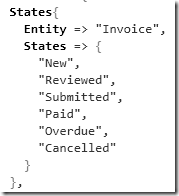
So as everything comes together your final MGraph looks like

1) Install OSLO
2) Start Intellipad
3) Switch to DSL Grammar Mode

5) Download and copy the MGrammar for the State Machine into the “DSL Grammar Mode Pane”
6) Download the sample text to be parsed to the windows labeled “StateMachine” mode.
In the next post in this series we will take the MGrammar and do something useful with it using a C# application.
-ec
Note: This article primarily deals with constructing fairly large Line of Business applications. If you are building control systems or software that is more oriented to be used within other applications (Graphics Libraries, ORM’s, etc…), this article may not apply to your type of development. But who knows, we are breaking new ground here.
If you read my last post, I’ve asserted that when constructing a typical LOB type application, you should focus on your data model and work up from there. The thought being that the most static part of your system will be the data and it’s relationships.
I’m not going to dwell on it here, but I think some sort of ORM should be placed on top of that data model. ORM’s are really a commodity. They all have their strengths and weaknesses. If you’re not using some sort of ORM you should at least see what they have to offer. My ORM Smackdown project is a good place to check out different ORMs. Although your technology for implementing a data model and an ORM might change, I will submit in one-way-or-another, these two components are fairly “settled law”.
As we start moving up the stack, the next layer is business logic. The business logic layer is where most of the code for your application should live and is going to be somewhat dynamic with respect to time and changes in the business. Yes, there is the potential for changes to happen to your data model, but if you have enough systems under your belt you know most of these changes are additions, not changes to the structure. At a very high level there are two components of a the business logic layer, Business Rules and Functional Requirements.
According to Wikipedia a Business Rule is defined as:
A statement that defines or constrains some aspect of the business. It is intended to assert business structure or to control or influence the behavior of the business
And a Functional Requirement is defined as:
A functional requirement defines a function of a software system or its component. A function is described as a set of inputs, the behavior, and outputs
Oslo has the potential to change change the way we enforce the Business Rules and satisfy the Functional Requirements in our business logic layer.
Before I go too much further, I’m going to make a claim that I’ll need you to think about before we go too much further.
There are two primary activities that a user or other system does when they interact with a system. 1) Annotate “something” with some additional data via user entry, calculation or call to a service. 2) Interact with “something” to enable a future state of that “something” based upon constraints.
This might not be obvious when you are building your software, but at a certain level of abstraction if you think about out it, these are probably valid statements.
As I stated before Oslo provides us mere mortals a mechanism of quickly and easily constructing a grammar or Domain Specific Language (DSL). So the idea is that we build up small highly configurable “chunks” of functionality that could very easily be unit tested. Then we use a DSL to glue these together to satisfy the functional requirements of the systems we are constructing.
Let’s take the example of submitting an invoice. We are going to model our invoice as a finite state machine. This sample is a greatly simplified business flow but let’s assume our invoice as three states, “New”, “Submitted” and “Paid”. Our first syntax will be used used to define our states. It might be something like:
The states of our invoice are New, Submitted and Paid.
This defines a new entity or object in our system called Invoice. It also defines that state our invoice can be in, which are New, Submitted and Paid.
Next we need to define some business rules, these could be defined as something like:
The invoice can transition between New to Submitted and from Submitted to Paid.
This maps the business flow that the invoice must follow. It is possible for an invoice to go from New to Submitted but it is not possible for it to go from New to Paid. This is obviously a simple process flow but for a more sophisticated process flow, I’m sure you could see how this might be useful.
Now if we want to add some additional states to our system we can use the following grammar.
The states of our invoice are New, Cancelled, Submitted, Overdue and Paid.
To make things a little more interesting, our transitions will then be updated to:
The invoice can transition between New to Submitted, New to Cancelled, Submitted to Cancelled, Submitted to Overdue, and from Submitted to Paid.
Defining the states and transitions is the foundation and first step as well as something that can easily be managed by a DSL.
This is the first layer we will be using to define business rules and functional requirements, there is much more to come, but this seems like a good place to end this post. In our next post we show how we can use “M” to take the syntax and turn it into something that is useful for a computer. As we progress through these posts, I will probably do one post like this that introduce the concept and a follow up on how that concept would be implemented in Oslo.
Until next time…
-ec
What is the primary thing we do as software engineers? Write code? Well maybe, but what is the purpose of the code we write? I would argue that the primary reason we write code is to fill some sort of need, that need might be making your life easier or more enjoyable, saving time or helping your company decrease costs, improve sales or improve customer satisfaction.
Software is expensive to write and maintain, but why? I will argue again because it’s written in “code”. Wikipedia defines code as:
In communications, a code is a rule for converting a piece of information (for example, a letter, word, phrase, or gesture) into another form or representation (one sign into another sign), not necessarily of the same type.
This generally involves translating the problem you are trying to solve to the programming language du-jour. I’m sure you’ve heard of the telephone game where someone tells a story, they tell that story to someone else and soon the story does not resemble the original. Software development is incredibly frickin’ difficult and if you are lucky enough to have the original “story-teller” know enough and tell you an accurate account of what your system needs to happen, will you interpret it correctly and translate it to code properly. Good luck. All the latest techniques such as agile and all its offshoots claim to make your software highly, well agile, adaptable to change. If you need to translate a moving target such as a highly complex set of business rules, today this is probably the right approach.
Before we get into my primary assertion that Oslo has the potential to be a game changer, please allow me to take a slight detour and explain an assumption and something I’ve learned over the years.
The most valuable asset you will have when designing a system is the model that describes that data and the relationships of that data within your system. This is the core premise of Object Orientation. With respect to time and changes in business operations, the behaviors, business rules and functional requirements will change, the data that is used by those components is the most static part of the system. Spend your time up-front beating up your data model and specifically they relationships between the data.
Let’s assume that you allow me to claim that the data model is the most important part of your system and you have accurately modeled that data that represents your organization or problem. Now what? You need to describe how that data behaves with respect to actions and time. This is could be described in something called a Finite State Machine. If done properly, our data model should be able to accurately represent the data for the objects as they transition between states. We need a mechanism to describe the conditions in which these transitions are possible as well as what additional behaviors are executed as they transition between states.
Now back to Oslo.
In my humble, yet reasonably experienced opinion this is where Oslo has the potential to become a game changer. Let me explain. Oslo has the potential to bring a fundamental shift not in the tools and technology we use to develop our systems but by providing a mechanism to facilitate a radically different approach in solving problems. It does this by letting us mere mortals quickly and easily build DSLs or domain specific languages without having to design lexers and parsers. Since this is a fundamental shift in our discipline, it’s too early to target DSL’s to our end users.
The DSLs we define with Olso should be used by the people that know the problem to describe relationships, business rules, functional requirements and behaviors in a syntax that they can read, write and understand. These DSLs will then be translated directly to something that can be executed without additional involvement of a “coder”.
In this brave new world where we provide the tools for the people that understand the problem to solve their own problems, we the coders will have some new roles:
This is obviously a fairly large topic that I’ll be expanding on in the next few weeks but let me close by an example of DSL you might be familiar with:
This DSL is intended to be used by an end user, but start thinking about how you could use this same concept in your application to configure business logic.
When a payment is received on an invoice, transition that invoice from Pending Payment to Paid and send a confirmation email.
If you had a mechanism that would turn that grammar into some sort of expression tree, could you provide some sort of engine to execute it?
Until next time
-ec
Ok – now you created your MGrammar, have a project to turn your users input from text to MGraph, now what? You have a few options. For my little toy project I want to take the users input and turn it into a graph of POCO objects that I can do something with. When defining your grammar you will have the opportunity to define the projections or how you want your MGraph to look. You can find a great article on MGraph at MSDN.
Intellipad is great when defining, testing and building the projections for your grammar. Here is the relevant portion of the MGraph generated by the About My Pets grammar:
Sample MGraph Output Fragment, this would be considered one record within MGraph.
{
PetInfo => {
Name => "Razor",
AnimalType => "Terrier",
Age => "9",
Sex => "female",
PrimaryColor => "white",
SecondaryColor => "brown"
},
Activities => {
{
Type => "jump",
Minutes => null,
Seconds => "12"
},
{
Type => "bark",
Minutes => "2",
Seconds => null
}
},
Meals => {
{
Cups => "1",
MealTime => "breakfast"
},
{
Cups => "2",
MealTime => "dinner"
}
}
}
First off let’s generate some XAML, from our input. I found this was a good way to understand what was going on under the hood as well as some of the terminology.
First off, we need to configure a command prompt to get it a little easier for you work with the Oslo command line tools. To do this create a simple .CMD file somewhere and add the following text:
@set PATH=%PATH%;%programfiles%\Microsoft Oslo\1.0\bin
Then create a short cut to that file with the following information:

Click on that shortcut to open the command prompt, you should now have the Oslo tools in your path, to test this simply type “m”
and you should see something like this:

Now back to our regularly schedule post. First we need to compile our grammar so change the directory to where your file was saved and type:
C:\MyDirectory\m [MyGrammarFile].mg
When you do so, you should see the following:

This created a compiled version of your grammar with an MX extension, confirm this by looking at the contents of the directory.

Now we are ready to do something with our input file, so save a sample of user input into a text file in something like UserInput.txt
The sample I saved is similar to:
About my pets
Razor is a Terrier that is a
9 year old female, and her color is white.
She will jump for 15 seconds and bark for 2 minutes.
She eats 1 cup of food for breakfast and
eats 2 cups of food for dinner.Rocket is a Rat Terrier that is a 6 year old male,
and his color is black. He will whine for 3 minutes.
He eats 2 cups of food for dinner
Next run the following:
C:\MyDirectory\mgx /r:[MyGramamrFile].mx UserInput.txt /t:xaml
This will generate a XAML file from your sample user input or let you know any errors that may have occurred.
From my sample grammar, here is portion of the generated XAML.

This is nice, and may be a little easier to parse, but what I really want to do is deserialize MGraph into a tree of POCO (plain old CLR objects) so I can do some “stuff” with the data. I built a simple method to load the compiled grammar, and build an in-memory representation of the parsed user input with an instance of System.Dataflow.GraphBuilder from the Oslo runtime library.
Before you get started, you need to add references to your project:
using Microsoft.M;
using System.DataFlow;
Both can be found in the <Program Files>\Microsoft Oslo\1.0\bin directory
First we need an class that knows how to format parsing errors, this will inherit from System.DataFlow.ErrorReporter.
using System;
using System.Dataflow;
using System.Linq;
namespace PetParser
{
class ParserErrorReporter : ErrorReporter
{
protected override void OnError(ErrorInformation errorInformation)
{
string msg = string.Format(errorInformation.Message, errorInformation.Arguments.ToArray());
throw new FormatException(
string.Format("Syntax error at [{0}, {1}]: {2}",
errorInformation.Location.Span.Start.Line,
errorInformation.Location.Span.Start.Column,
msg));
}
}
}
Next we’ll create a simple method to load up our compiled grammar, build a parser instance, perform the parse and hand the MGraph representation as an object graph of a set System.Dataflow.Node instance.
public void ParseGrammar(string grammar)
{
//Load the grammar that was compiled into the assembly as a resource.
using (var img = MImage.LoadFromResource(System.Reflection.Assembly.GetExecutingAssembly(), "PetParser.mx"))
{
//Load up the specific MGrammar file.
var factory = img.ParserFactories["Pets.MyPets"];
//Create our parser.
var parser = factory.Create();
//Create an instance of NodeGraphBuilder to let the
//parser know what type of graph to build.
parser.GraphBuilder = new NodeGraphBuilder();
try
{
var grammarTextStream = new StringTextStream(grammar);
//Attempt to parse the grammar, any errors will be
//formatted via the ParserErrorReporter and handed
//via Try/Catch
var root = (Node)parser.Parse(grammarTextStream, new ParserErrorReporter());
WalkTree(root);
}
catch (FormatException exc)
{
//If we get an error parsing the grammar, just write it (for now)
LogIt(0, exc.Message);
}
}
}
void WalkTree(Node node, int level)
{
foreach (Edge recordEdge in node.Edges)
{
var value = string.Empty;
if (recordEdge.Node != null && recordEdge.Node.AtomicValue != null)
value = string.Format(@"Value: ""{0}""", recordEdge.Node.AtomicValue.ToString());
LogIt(level, "{0}. [{2}] Brand Text: \"{3}\" Label Text: \"{4}\" {5}", level, node.Brand.Text, node.NodeKind, node.Brand.Text, recordEdge.Label.Text, value);
WalkTree(recordEdge.Node, ++level);
--level;
}
}
Now when we execute this we get the following output

The following table is from the MSDN Page “MGraph Object Model”

Now that we are walking the tree, we just need to create instances of and populate our simple .NET types. This could be done with some sort of state machine or an implementation of the visitor pattern.
I wouldn’t be very surprised if in upcoming releases of Oslo there will be built in mechanisms to create some sort of .NET code/assemblies and provide automatic serialization/deserialization using MSchema, but for now this isn’t too bad.
Next task is to build a front end to collect user input. I’m thinking along the lines of an Azure hosted Silverlight application. I’m thinking the grammar will be passed to the sever via WCF and all the actual parsing will happen there.
-ec
Intellipad is an awesome tool, but if you really want to do some work with Oslo you are probably going to need to write a little code. This implies that you will need to get your MGrammar definition files into your Visual Studio project.
Once you create and do some testing on your MGrammar definition files within Intellipad save them with the extension .MG and include them within your Visual Studio.NET project. Next you will need to do a bit of hand-coding on your project file, the easiest way to do this is just to click on “Unload” and the “Edit”.


Once you do that, you will need to modify your project file with the following changes:

and

and then finally change the action for your .MG file

Here are the actual lines for you to cut-and-paste enjoyment:
<MgTarget>Mgx</MgTarget>
<MgTarget>MgxResource</MgTarget>
<MgIncludeReferences>false</MgIncludeReferences>
<MGrammarLibraryPath Condition="'$(MgCompilerPath)'!=''">$(MgCompilerPath)</MGrammarLibraryPath>
<MGrammarLibraryPath Condition="'$(MGrammarLibraryPath)'==''">$(ProgramFilesx86)\Microsoft Oslo\1.0\bin</MGrammarLibraryPath>
<Import Project="$(MSBuildExtensionsPath32)\Microsoft\M\v1.0\Microsoft.M.Embedded.targets" />
Once you’ve done this, you will need to reload your project.
At this point when you compile, your MGrammar should get compiled and included in your project as a resource. You can verify this by using Reflector.

Now to actually do something with this in your application you need to load the resource. The following chunk of code will do that for you:
DynamicParser parser = null;
using (var img = MImage.LoadFromResource(System.Reflection.Assembly.GetExecutingAssembly(), "AboutMyPets.Web.mx"))
{
var factory = img.ParserFactories["Pets.MyPets"];
parser = factory.Create();
}
Also as a side note, you will need to add the following reference to your project.
using Microsoft.M;
using System.DataFlow;
Both can be found in the <Program Files>\Microsoft Oslo\1.0\bin directory
Now that we have our grammar loaded from a resource into M’s DynamicParser instance we can pass in some text and hopefully get something meaningful out of it. Stay tuned for an upcoming post…
-ec
Ever since working with FORTH, I’ve been a big fan of languages and understanding how they work. FORTH did a great job of extending FORTH using FORTH, very cool. Last fall I was introduced to Oslo, and was very impressed. At the time, it looked like a pre-bleeding edge CTP, so I didn’t spend too much time with it. Today (May 26, 2009) Microsoft released the May CTP of Oslo. Although I’m sure the standards aren’t 100% baked, if you are interested, now is the time to start playing with it. I have good intentions of publishing a better description of how this grammar was built, but with the limited time I have, I wanted to at least get my first grammar on my site. There will be three components you need to know about when using Intellipad, the first is the development of the grammar, the second is where you enter your sample grammar and the third is the output. The output is in the form of MGraph which you can use in your application.

module Pets
{
@{CaseSensitive[false]}
language MyPets
{
syntax Main = i:InitialStatement
additional:(ThePet)+
friends:(Friends)+
foes:(Foes)+
=> MyPets {
valuesof(additional),
Friends [valuesof(friends)],
Foes [valuesof(foes)]
} ;
syntax ThePet = t:Pet w:Activity+ h:HowMuchTheyEat+
=> {t, Activities [valuesof(w)], Meals [valuesof(h)]} ;
syntax Friends = f:PetsFriends => {valuesof(f)};
syntax Foes = f:PetsFoes => {valuesof(f)};
token Upper = 'A'..'Z';
token Lower = 'a'..'z';
token Digit = '0'..'9';
token Name = Upper Lower*;
token Time = '0'..'9' Digit?;
token Age = '0'..'9' Digit?;
token Cups = '0'..'9' Digit?;
token Type = Upper Lower*;
syntax Action = 'run' | 'jump' | 'play' | 'bark' | 'fetch'
| 'hunt' | 'whine';
syntax Sex = 'male' | 'female';
syntax Color = 'white' | 'black' | 'brown';
syntax MealTime = 'breakfast' | 'lunch' | 'dinner';
syntax AnimalTypes = 'Rat Terrier' | 'Terrier' | 'dog' | 'cat'
| 'fish' | 'bird' | 'pig' | 'Poodle';
syntax Pronoun = "he" | "He" | "she" | "She" | "Her"
| "His" | "her";
@{Classification["Keyword"]} token AnimalColor = "color is";
@{Classification["Keyword"]} token Will = "will" | "will also";
@{Classification["Keyword"]} token Eats = "eat" | "eats";
@{Classification["Keyword"]} token CupsOfFood = "cups of food for"
| "cup of food for";
@{Classification["Keyword"]} token For = "for";
@{Classification["Keyword"]} token IsFriends = "is friends with";
@{Classification["Keyword"]} token DoesntLike = "does not like";
@{Classification["Keyword"]} token IsA= "is a";
@{Classification["Keyword"]} token Minutes = "minutes"
| "minute";
@{Classification["Keyword"]} token Seconds = "seconds"
| "second";
@{Classification["Keyword"]} token And = "and";
@{Classification["Keyword"]} token YearOld = "year old";
syntax InitialStatement = "About my pets";
syntax Pet = n:Name IsA t:AnimalTypes IsA a:Age YearOld s:Sex
Pronoun AnimalColor c:Color
=> Profile {Name=>n, AnimalType=>t, Sex=>s, Color=>c};
syntax Activity = Pronoun? Will? a:Action For? m:Time? Minutes?
s:Time? Seconds?
=> Activity {Type=>a, Minutes => m, Seconds => s };
syntax HowMuchTheyEat = Pronoun? Eats q:Cups CupsOfFood m:MealTime
=> HowMuchTheyEat {Cups=>q, MealTime=>m};
syntax PetsFriends = n:Name IsFriends f:Name
=> Friends {Name=>n, Friend=>f};
syntax PetsFoes = n:Name DoesntLike f:Name => Foes {Name=>n, Foe=>f};
interleave whitespace = ("and" | "," | " " | "\r"
| "\n" | "\t" | "." | "that")+;
}
}
What you see in bold is the tokens that make up my grammar, the plain text are the values I want to extract as data.
About my pets
About my pets
Razor is a Terrier that is a 9 year old male, and
her color is white. She will jump for 15 seconds
and bark for 2 minutes. She eats 1 cup of food for
breakfast and eats 2 cups of food for dinner.
Razor is friends with Rocket
Rocket does not like Rascal
MyPets{
[
{
Profile{
Name => "Razor",
AnimalType => AnimalTypes[
"Terrier"
],
Age => "9",
Sex => Sex[
"male"
],
Color => Color[
"white"
]
},
Activities[
Activity{
Type => Action[
"jump"
],
Minutes => null,
Seconds => "15"
},
Activity{
Type => Action[
"bark"
],
Minutes => "2",
Seconds => null
}
],
Meals[
HowMuchTheyEat{
Cups => "1",
MealTime => MealTime[
"breakfast"
]
},
HowMuchTheyEat{
Cups => "2",
MealTime => MealTime[
"dinner"
]
}
]
}
],
Friends[
[
{
Name => "Razor",
Friend => "Rocket"
}
]
],
Foes[
[
{
Name => "Rocket",
Foe => "Rascal"
}
]
]
}
More to come, I’m really excited about this technology!
Updated 6/12/2009 – Added Friends and Foes grammar and changed MGraph Structure
-ec