I was looking for a topic to present at a Tampa MVC SIG meeting. Last year I did a proof-of-concept for a client on a web version of their application using ASP.NET MVC that would run on an iPhone. This was done on one of the first previews so porting it to the ASP.NET MVC RTW would be more work than starting from scratch. I needed to come up with a new application that wouldn’t totally suck and put the audience to sleep while presenting. After thinking about the “get-togethers” that Joe Healy (Tampa Developer Evangelist) puts on after the user group meetings at the Green Iguana, it hit me, how about a site for this. Hence “Geeks at Bars”.
The idea is a simple web site to let others know where developers are at chatting tech. What makes this interesting is the ability present the same content with different controllers using different view templates. The original support was built for the Desktop, Windows Mobile, iPhone and Android. Blackberry is planned but due to the lack of a decent browser support it will require a unique template.
This most up to date source is located on CodePlex. The rest of this post shows at a high-level how ASP.NET MVC was extended with a fairly robust templating engine to support mobile.
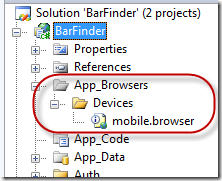
Step One – Download and copy the open source browser capabilities file from CodePlex into your project. This file add some capabilities to parse additional attributes from the User Agent string that the browser/device sends to the server. This file should be placed into the /App_Browsers/Devices directory as shown:
Step Two – Based upon information parsed from our User Agent string we need to figure out the type device that is requesting data so we can send down the correct skin. First we create an enum for the different types of skins we will create remember we aren’t getting into a lot of details here and the code in this post is images so all the code can be downloaded at http://www.codeplex.com/geeksatbars :

Then we parse the data and return the skin type based upon content from the User Agent:

Note if you download and run DebugView it will output diagnostics information, before to click on Show Global Events to pickup debug messages from IIS.
Finally we add an extension method to the Browser instance so we can get the skin anywhere we can access the Request.Browser instance.

Step Three – Put in logic to use different master pages based upon the skin. Our new view page will inherit from ViewPage and we override the OnPreInit method.

It’s important to note that all our pages will now need to inherit from GeeksAtBarsViewPage as follows:

Note – we still have MasterPageFile specified here as Desktop.Master but our OnPreInit method will make sure we use the proper one based upon the skin.
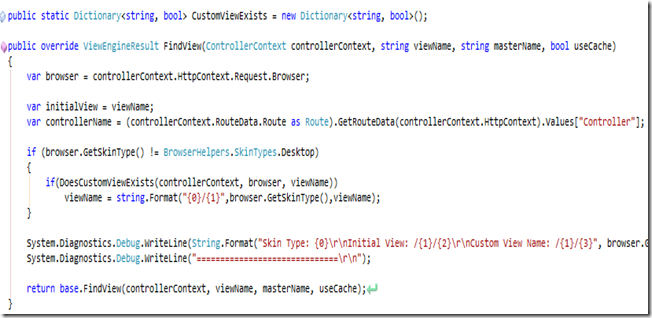
Step Three – We need to inherit from WebFormViewEngine and override the FindView method. The FindViewMethod will check to see if we need to send down a different skin and if so return a different viewName. We do this by checking to see if the file exists on disk and if so we change the viewName, once we determine we need to send down a different skin we cache that information so we don’t have to hit the disk each time. Please download the source to get a better idea of how this works.

We also need to create the templates for the skins:

Where MobileWebKit and WiMo are skins. The custom view engine will see if a requested view exists within the directory corresponding to the skin. If it does that view is used if it isn’t then the default view will be rendered. That way we don’t have to create new views for every page in our site.
Step Four – We need to let ASP.NET MVC know which view engine to use, we do this within the Global.asax.cs file

Once we do this we should be ready to go.
So in summary here is how this works.
- We downloaded and copied the mobile.browser file into the App_Browsers/devices directory.
- Next we created some extension methods on the Browser object to return the skin type.
- Then we created a new class that inherits from ViewPage that overrides the OnPreInit method to change the master page if the device needs a different skin.
- Creating a new ViewEngine that overrides the FindView method to see if a custom views template exists and if so return the path to that custom view.
- Then we create our custom view in the Views directory under a directory named the name of the skin that our custom ViewEngine will pickup.
- Our final step is to register the CustomView engine within the Global.asax.cs file.
This approach seems to be working out fairly well. I left out some of the small details here, but I’m assuming if you made it this far you probably have a good idea of ASP.NET MVC but if you have any questions, drop me an email at kevinw –at- (slsys).net. Again the source code has been released at http://www.CodePlex.com/geeksatbars
Enjoy and if you are talkin’ geek at a bar, fire up your Windows Mobile or iPhone navigate to www.GeeksAtBars.com and tell people about it! One note: our current version doesn’t allow you to add bars on your phone, you need to do this in a full browser.
-ec


