On August 8, 2012, the NiVek GO! QC1 (Quad Copter1) built with Microsoft .NET technologies will make it’s debut at the Tampa Windows 8 User Group meeting.

You may ask what does a Quad Copter have to do with Windows 8? Well, the flight console as pictured below runs on a Windows 8 Slate.

Not 100% a metro app, but it’s not a typical application either 
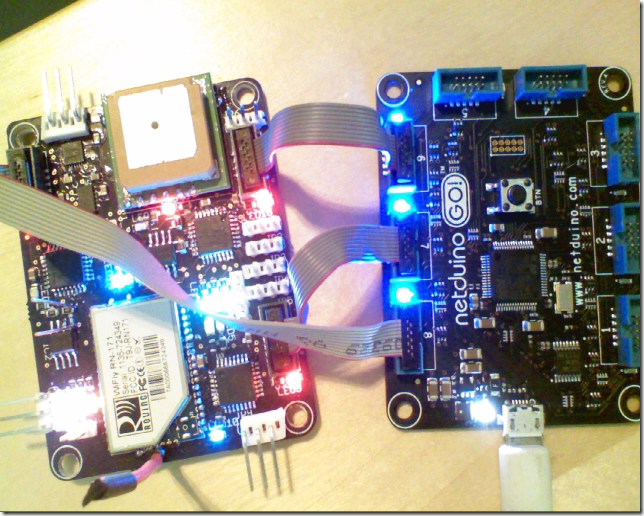
The “brains” or flight computer behind the quad copter is really in four parts. Yes, that’s right there are four processors use to power the copter. First is a board I designed that has 3 STM8 chips a bunch of sensors and some EEPROMs used to keep data when the power is pulled.

The second is the new Netduino GO! board

You can see how they are connected in the following picture, via something called SPI.
Do you really need four processors?
You may ask, does it take four processors to drive a Quad Copter. The answer is: well probably not, however a quad copter is inherently unstable and it does require a good amount of processor power to provide a “fly-by-wire” mechanism to keep it stable. The idea here is to use a modular approach where each processor has an assigned responsibility, it does only one or two things and it does them very well (or what’s important here, very fast on a very highly predictable time frame).
What do each processor do?
GO! Main Board – The Netduino GO main board provides orchestration of flying the copter. The software for this is primarily written in C# running on the Microsoft .NET Micro Framework. Not really time critical things but more strategic. Things like routing messages between the different modules. Considerably more on this to come in future posts
Sensors Module – It’s one responsibility is to figure out the attitude of the quad copter, that is to say the pitch, roll and yaw. This also has sensors for altitude and a GPS. The sensors in the first generation of my board are a 3 axis gyro ITG3200. A 3 axis accelerometer and 3 axis magnetometer (electronic compass) LSM303DLHC. A sensor to measure air pressure (which can be used to accurately determine altitude) BMP085. And finally a fast GPS module (10 updates per second) UP501.
Flight Control Board – This really has three main functions:
- Quad copter is flown by a standard Remote Control transmitter. The first task of the flight control board is to take the PWM (Pulse Width Modulation) from the receiver and turn it into inputs for the flight control computer.
- Next step is the fly by wire algorithm. This takes the current attitude (how much the quad copter is tilting in the X/Y plane) and combines that with the input from the RC receiver and figures how how much power needs to be applied to each motor to keep the Quad Copter from crashing.
- Finally the Flight Control board takes the power to be applied to each motor in the form of a percentage and changes that into another PWM signal that is applied to the ESC (Electronic Speed Control) that controls the brushless motors.
Telemetry Board – The primary purpose of this board is to establish a link from the on board computers back to the Windows 8 (and eventual Windows Phone 8) consoles. This uses the RN-171 WiFi module and an STM8S207 chip to provide these services. This modules purpose is very simple, take a byte array in very quickly via SPI, buffer it and then send it out via WiFi. It also listens for commands from the flight console and relays them to the GO! main board for processing.
Couple final pictures
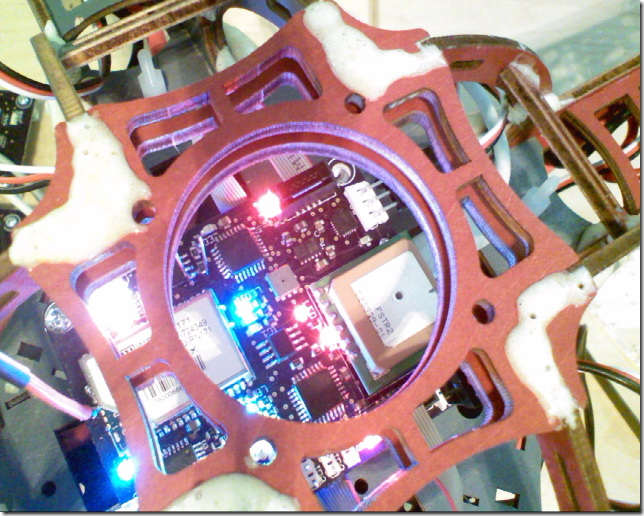 This is the control board mounted on the Quad Copter Chassis. The white stuff is the Gorilla Glue I used to hold everything together. Didn’t realize how much of a mess it would make
  .
.

Close up of the Brushless motors and the 10” propellers.
What’s next?
Tonight I only have a brief amount of time to cover this project, for a more detailed run through of the hardware/software, please attend my session at the SWFL Code Camp in Napes on September 8. I’ll probably be flying it over lunch.
In addition over the next couple of months look for many more posts along with the publishing of the hardware and software for the NiVek GO! quad copter platform.
Until next time!
-twb


